Accessing Real-Time Data
Sealmetrics provides complete aggregated data up to yesterday by default. This ensures strong privacy alignment while giving you accurate insights without requiring additional consent.
Default Data View
When you open your dashboard, you will always see:
- Full, consolidated data for all past days
- No data for the current day, unless you explicitly enable real-time tracking
This protects visitors’ privacy by avoiding real-time behavioral monitoring unless opt-in is explicitly enabled.
Viewing Today’s Real-Time Data
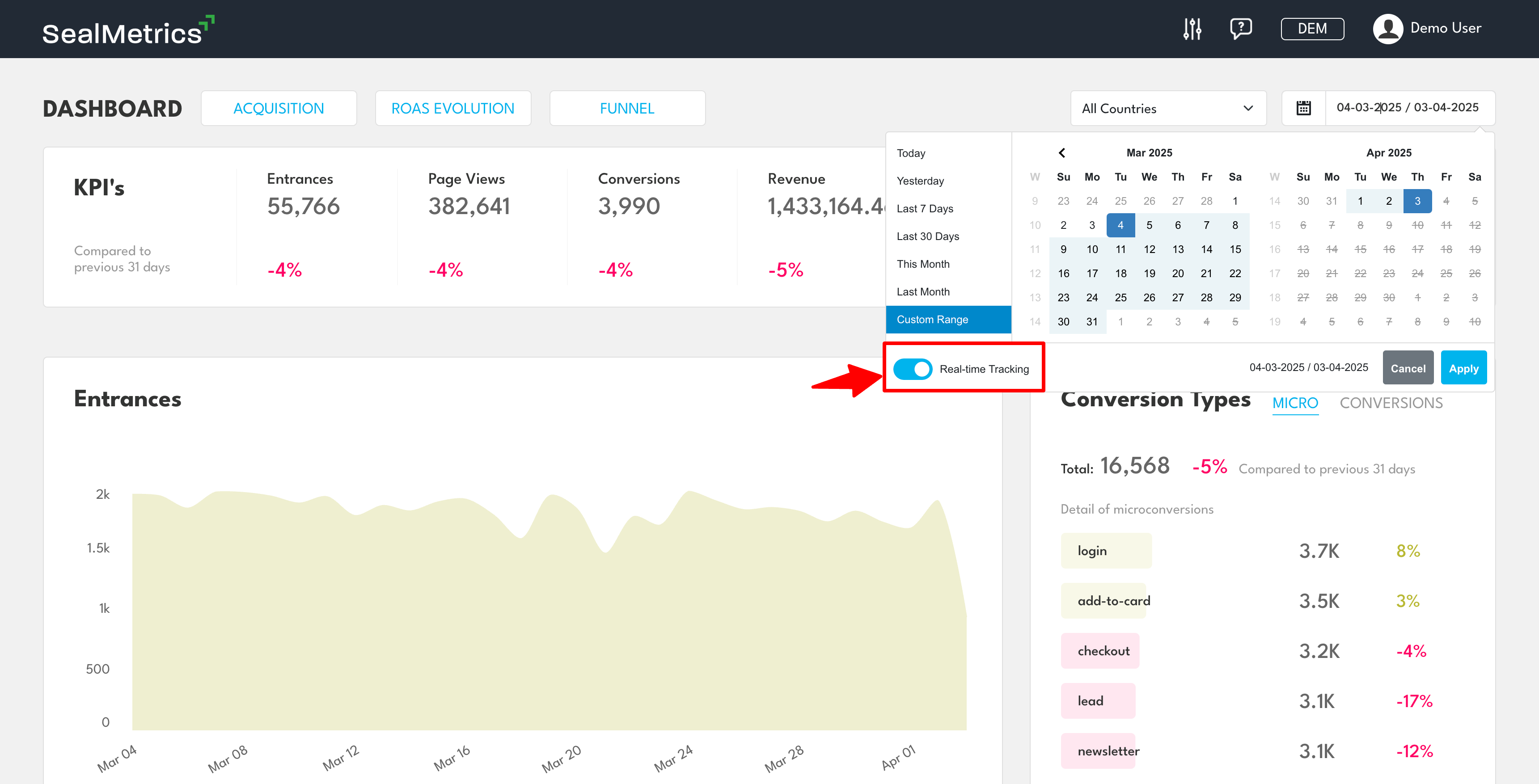
To access today’s live data, follow these steps:
- Open your Sealmetrics dashboard
- Navigate to the calendar
- Check the Real-time Tracking checkbox
Privacy Regulation Compliance
Real-time data is considered behavioral monitoring, and regulators require explicit opt-in for this type of data collection.
This means:
- Real-time mode is disabled by default
- Activating it means you confirm valid user consent has been obtained
- Sealmetrics keeps you compliant with GDPR, ePrivacy, CCPA, and PECR
This ensures you remain fully compliant while still having the option to analyze real-time activity when necessary.
Sealmetrics’ default of providing aggregated data up to “yesterday” ensures privacy compliance by design — while still giving you access to real-time insights when user consent allows it.