First-Party Tracker
Serve the Sealmetrics tracker from a subdomain of your own domain (e.g. metrics.yourstore.com) instead of t.sealmetrics.com.
Why first-party?
Ad blockers work mostly from lists of known third-party tracking domains. When the script and its requests load from your own domain, they are far less likely to be blocked — which means fewer gaps in your data. It also keeps the entire measurement flow within your domain's context, consistent with Sealmetrics' first-party, consentless design. See Ad-blocker resistance for the full picture.
Setup
The process takes two minutes of your time plus a confirmation from our team.
1. Get your subdomain from the dashboard
- Log in to my.sealmetrics.com
- Go to Settings → Pixels
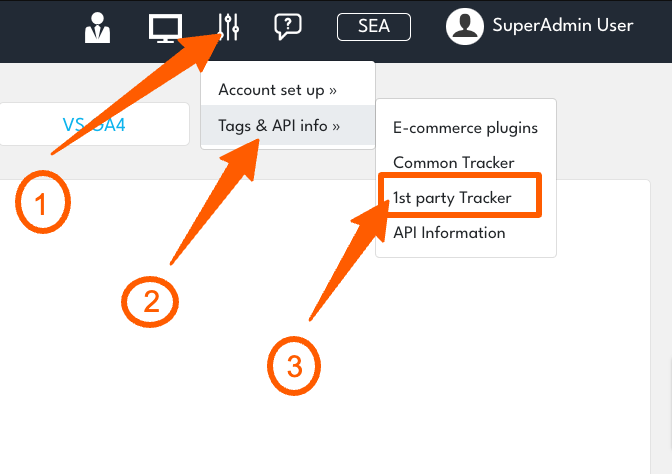
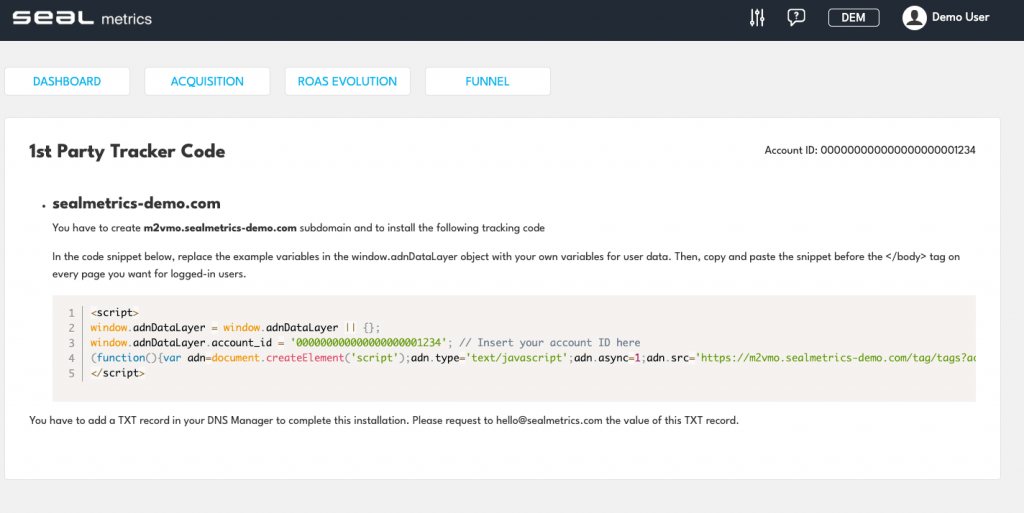
The 1st Party Tracker Code screen shows the subdomain to create and the snippet you'll use later:
If you track multiple domains in one site, create the same subdomain on each of them.
2. Create the DNS record
In your DNS manager, add an A record for that subdomain pointing to:
45.148.1.221
DNS changes can take from a few minutes up to 24–48 hours to propagate, depending on your provider and TTL.
3. Tell us, and we finish the server side
Email hello@sealmetrics.com once the record is in place. We complete the server-side setup for your subdomain and confirm by email.
4. Install the snippet
When you receive the confirmation, copy the Tracker Code snippet from the same screen into the <head> of your website — it's the standard tracker, just served from your subdomain. All tracker options (?auto=0, ?spa=0, content grouping) work exactly the same.
Verify it works
Visit your site and check that Last hit updates on the Overview report within seconds. If it doesn't:
- Confirm the A record has propagated (
dig your-subdomain.yourdomain.com) - Confirm you replaced the old
t.sealmetrics.comsnippet (don't run both — you'd count pageviews twice) - Check the browser console for blocked requests
Related documentation
- Tracker Installation — standard installation and script options
- Ad-blocker resistance — why first-party loading matters
- Troubleshooting — common installation issues
Questions? hello@sealmetrics.com